
Want to learn how to use Helium 10 Cerebro for Amazon keyword research? Finding keywords is easy. Deciding which keywords genuinely match a product is much harder.
Helium 10 Cerebro (Plus Magnet) supports both reverse-ASIN and keyword-based research. Depending on their subscription plan, Amazon sellers can investigate their own or competing products, compare multiple ASINs, apply advanced keyword filters, export research data, and explore historical keyword trends. These capabilities can support listing optimization and advertising research, but the metrics still require careful interpretation.
For our hands-on case study, SaleMigo used Cerebro’s supplied demo ASIN (B00G5M75UK) on Amazon US. During our November 8, 2026 research, we exported 7,791 keyword rows and narrowed the results to 686 using three filters before reviewing product relevance. This guide explains the practical workflow while distinguishing our independently examined data from paid-plan capabilities documented by Helium 10. Search-volume estimates and ranking data do not guarantee sales or future performance.
Affiliate Disclosure: SaleMigo may earn a commission from qualifying purchases or subscriptions made through affiliate links on this page, at no additional cost to you. Affiliate relationships do not affect our hands-on testing, evidence, or editorial conclusions.
What Is Helium 10 Cerebro?
Helium 10 Cerebro is an Amazon keyword research tool that helps sellers investigate search terms associated with their own products or competing listings. Its reverse-ASIN functionality allows sellers to enter an Amazon Standard Identification Number (ASIN) and examine the keywords associated with that product.
In January 2026, Helium 10 integrated Magnet’s keyword-discovery functionality into Cerebro. The combined tool, known as Cerebro (Plus Magnet), supports both ASIN-based research and keyword-based discovery. Sellers can start with a product ASIN, explore related keywords from a seed phrase, or analyze an existing group of keywords.
Cerebro provides research metrics including estimated Search Volume, Organic Rank, Sponsored keyword indicators, Competing Products, Title Density, and Search Volume Trends. Depending on their subscription plan, sellers may also access multi-ASIN comparisons, historical keyword analysis, and additional research features. These capabilities can support competitor analysis, listing optimization, and Amazon PPC keyword planning.
Our testing approach: For the hands-on workflow in this article, SaleMigo used Cerebro’s supplied demo ASIN and examined its keyword results, filters, and exported data. Other capabilities described in this guide are based on Helium 10’s official documentation rather than independent testing of every paid subscription feature.
Step 1: Choose a Relevant Amazon Product ASIN
A practical reverse-ASIN workflow starts with choosing a product that closely matches the type of listing you want to research. Relevance matters because keyword research tools can return thousands of search terms, including some that are only loosely related to the actual product.
With access to the relevant Cerebro subscription features, sellers can enter their own product ASIN or select a closely competing product to investigate its associated keywords. When comparing multiple products, choose ASINs that serve a similar customer need and marketplace. This helps make keyword comparisons more meaningful. Available ASIN limits and comparison features depend on the subscription plan.
For our November 8, 2026 Cerebro demonstration, we used one of Helium 10’s supplied demo products:
- Product: Best Pet Supplies 2-in-1 Stuffless Squeaky Dog Toy
- ASIN: B00G5M75UK
- Marketplace: Amazon US
- Selected Variant: Small, Wild Duck
The Amazon listing describes a stuffing-free plush dog toy with two built-in squeakers. The selected small variant does not have a bottle-insert compartment, and the listing states that the toy is not intended for aggressive chewers.
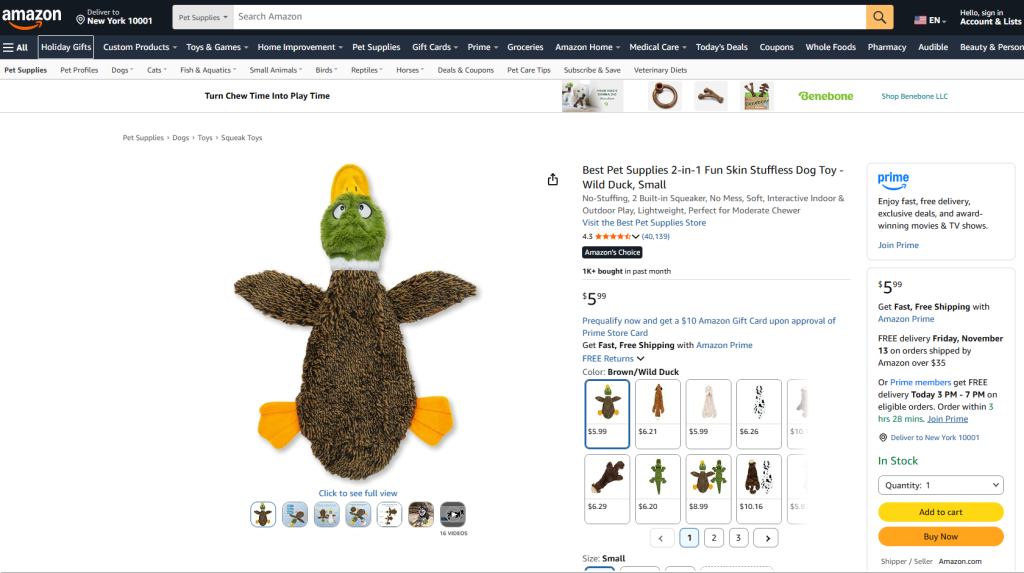
These details help us distinguish relevant keywords, such as “stuffless dog toys,” from terms that might attract searches but inaccurately describe the product.
Testing note: We used Cerebro’s supplied demo ASIN because our demo access did not allow unrestricted custom-ASIN searches. The following workflow demonstrates the filters and keyword data available in that session.
Step 2: Run Cerebro and Review the Keyword Distribution
With an eligible Helium 10 subscription, sellers can run Cerebro research using their selected Amazon ASINs and examine the resulting keyword distribution. They can then review organic and sponsored keyword indicators, estimated search demand, and other available metrics to investigate listing and advertising opportunities. The exact research capabilities and usage limits depend on the subscription plan.
To run a reverse-ASIN search in Cerebro, select your target Amazon marketplace using the marketplace dropdown, enter the product ASIN in the search field, and click Get Keywords. Cerebro then displays the keyword distribution, available filters, and keyword results.
After selecting the sample ASIN, we examined its keyword results in Helium 10 Cerebro (Plus Magnet), using the Amazon US marketplace.
The Cerebro dashboard displayed the following keyword distribution for ASIN B00G5M75UK:
- Total Keywords: 7,791
- Organic Keywords: 7,401
- Paid Keywords: 100
- Amazon Recommended Keywords: 761
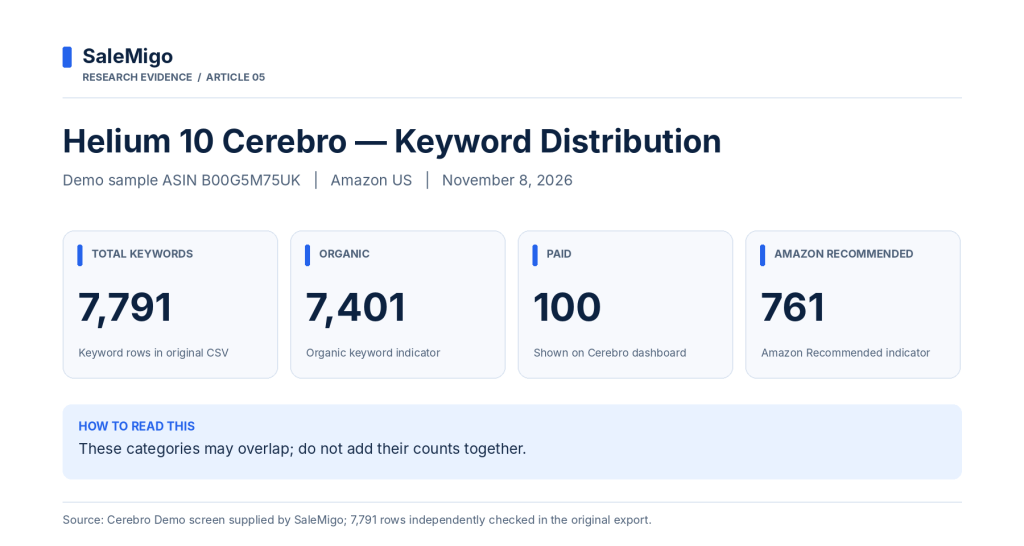
These figures provide an initial overview of the product’s keyword visibility. However, the categories are not necessarily mutually exclusive, so their counts should not be added together.
The results also include useful metrics such as estimated search volume, organic rank, competing products, and Cerebro IQ Score.
Our observation: A list containing 7,791 keywords is too broad to use directly for listing optimization. Some terms may be relevant, while others describe different products, features, or buyer intentions.
The next step is to apply filters and reduce the dataset before evaluating keyword relevance.
Step 3: How to Use Helium 10 Cerebro Filters to Narrow Your Keyword List
With access to Cerebro’s filtering features, sellers can adjust keyword criteria according to their own product and research goals. For example, they may combine minimum search volume, word count, organic ranking positions, and competition-related metrics to create a more focused keyword shortlist. The appropriate thresholds depend on the product category, competition, and research objective. Our following demonstration shows one practical example rather than a universal filtering formula.
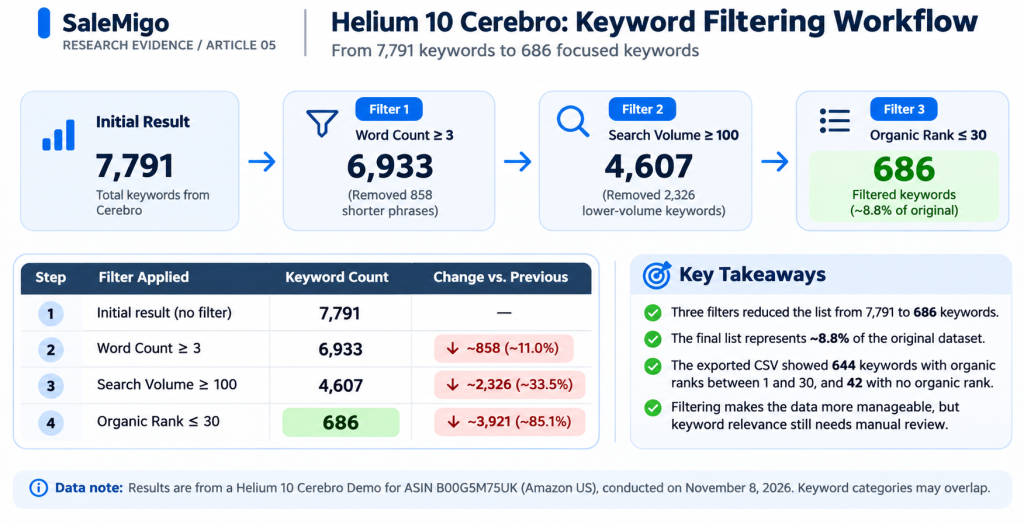
Cerebro returned 7,791 keywords for our sample ASIN, but using the entire list without filtering would make keyword selection difficult. We applied three filters sequentially to focus on more specific search terms with measurable search activity and stronger organic ranking signals.
Filter 1: Word Count — Minimum 3
We entered 3 in the Word Count minimum field and clicked Filter Results.
This reduced the list from 7,791 to 6,933 keywords, removing 858 shorter phrases. Longer keywords can provide more specific search intent, although word count alone does not establish relevance.
Filter 2: Search Volume — Minimum 100
Keeping the first filter active, we set the minimum estimated Search Volume to 100.
The remaining keyword count dropped to 4,607.
This threshold helped reduce lower-volume entries in our demonstration. It is an illustrative filter setting, not a universal recommendation for every Amazon product.
Filter 3: Organic Rank — Maximum 30
Finally, we entered 30 in the Organic Rank maximum field while retaining the previous filters.
Cerebro returned 686 filtered keywords, representing approximately 8.8% of the original dataset.
However, our exported CSV revealed an important limitation: 644 of the 686 filtered keywords had recorded organic ranks between positions 1 and 30, while 42 had no available organic rank and were not flagged as organic keywords for this ASIN. Of these 42 entries, 30 were Amazon Recommended-only, 7 were Sponsored Product-only, and 5 were Sponsored Brand Header-only. We therefore did not treat all 686 results as confirmed top-30 organic rankings. The export does not establish why Cerebro retained these entries after filtering.
The filtering process made the dataset more manageable, but it did not automatically identify the best keywords. Product relevance still needed to be checked manually.
Step 4: Review the Exported Keywords for Product Relevance
When keyword exports are available under their Helium 10 subscription, sellers can download Cerebro results for further analysis in a spreadsheet. This makes it easier to organize keywords, compare estimated search volumes and ranking positions, remove irrelevant phrases, and develop a focused shortlist for listing optimization or PPC research. Export availability and usage limits depend on the subscription plan.
Filtering reduced our Cerebro dataset to 686 keywords, but this did not mean every remaining keyword was suitable for the product.
We exported the filtered results and reviewed the keyword phrases alongside their estimated search volumes and organic ranking data.
Our next priority was product relevance. We compared potential keywords against the actual Amazon listing for the stuffless squeaky dog toy, considering its design, features, and intended use.
For example, keywords such as “stuffless dog toys” and “no stuffing squeaky dog toys” were potentially relevant to our selected product. However, the exported phrases “dog toys no squeakers” and “plush dog toys for aggressive chewers” each had a recorded organic rank of 17 for the demo ASIN, despite conflicting with the Amazon listing captured on November 8, 2026. The selected toy had two built-in squeakers and was not intended for aggressive chewers. This illustrates why ranking data alone cannot establish product relevance.
This distinction matters: a keyword can have attractive search metrics without being appropriate for a particular listing. Table 1 presents eight illustrative keyword examples selected from our filtered export, not an exhaustive shortlist or a ready-to-use keyword list for other products.
| Keyword Phrase | Est. Search Volume | Organic Rank |
|---|---|---|
| no stuffing dog toys | 4,328 | 2 |
| dog toys no stuffing | 2,672 | 2 |
| stuffless dog toys | 1,317 | 2 |
| stuffing free dog toys | 1,227 | 3 |
| duck toy for dogs | 1,122 | 14 |
| dog toys without stuffing | 829 | 11 |
| stuffing free squeaky dog toys | 602 | 2 |
| no stuffing squeaky dog toys | 546 | 2 |
Source: Helium 10 Cerebro Demo, Amazon US, ASIN B00G5M75UK. Data exported November 8, 2026. Search volumes are estimates. Rankings reflect the recorded sample-ASIN positions at the time of research, not guaranteed future rankings.
Step 5: Turn the Keyword Shortlist Into a Listing Plan
The next step is to organize relevant keywords by search intent rather than simply choosing the phrases with the highest search volumes.
For our sample dog toy, we identified three useful keyword groups:
- Core product terms: “no stuffing dog toys,” “stuffless dog toys,” and “stuffing free dog toys” describe the product’s main design.
- Feature-specific terms: “no stuffing squeaky dog toys” and “stuffing free squeaky dog toys” reflect its built-in squeakers.
- Product-type terms: “duck toy for dogs” describes the selected animal design.
A seller could use the most accurate core phrase in a product title, incorporate other natural variations into bullet points or descriptions, and consider relevant terms for Amazon PPC research.
However, these phrases should not be repeated unnaturally or added solely because their estimated search volumes are high.
Important: The recorded organic ranks belong to the demo sample ASIN. They do not predict how a new or different product will rank for the same keywords.
What Cerebro Data Can and Cannot Prove
Helium 10 Cerebro provides useful signals for Amazon keyword research, but its metrics should be interpreted carefully.
What the data can help you understand:
- Keyword visibility: Which search terms are associated with the analyzed ASIN and their reported ranking positions.
- Estimated search demand: Which keywords may attract more search activity relative to others.
- Keyword opportunities: Which relevant terms deserve further investigation for listing optimization or advertising.
What the data cannot establish:
- Guaranteed sales: High estimated search volume does not guarantee purchases.
- Future rankings: A product’s current organic position does not predict how another listing will perform.
- Product relevance: A keyword appearing in the results does not automatically make it appropriate for a particular product.
- Complete ranking coverage: Some exported keywords may have missing organic ranking data.
In our Cerebro demonstration, 42 of the 686 filtered keywords had no available organic rank. This illustrates why exported data should be checked rather than accepting every filtered result as a confirmed ranking.
Is Helium 10 Cerebro Worth Using for Keyword Research?
Helium 10 Cerebro is worth considering for Amazon sellers who regularly research competing products, investigate keyword opportunities, and optimize their listings or advertising campaigns. Rather than relying only on individual keyword searches, sellers can use Cerebro to build a more structured research process.
With an eligible subscription, sellers can research their own or competitors’ ASINs, explore related keywords, apply advanced filters, and export data for further analysis. Higher-tier capabilities, such as multi-ASIN comparisons and historical keyword analysis, may provide additional value to sellers managing multiple products or conducting frequent competitor research. Feature availability depends on the selected plan.
Our November 2026 hands-on demonstration showed how Cerebro’s keyword data could be filtered from 7,791 entries to 686 candidates and reviewed for product relevance. However, this case study used a supplied demo ASIN and did not independently evaluate every paid subscription feature.
Our recommendation: Consider Cerebro if your Amazon selling workflow requires regular keyword research and competitor analysis. Before subscribing, compare the current plans, usage allowances, and available features against your actual research needs. Estimated search volumes and ranking metrics should support informed decisions rather than be treated as guarantees of sales or ranking improvements.
Explore Helium 10 Cerebro
Interested in trying the keyword research workflow yourself? Explore Helium 10 and review its current subscription options.
Affiliate links. Plan features, eligibility and pricing may change.
Frequently Asked Questions (FAQ)
How do I use Helium 10 Cerebro to find Amazon keywords?
Open Cerebro (Plus Magnet), select your target Amazon marketplace, enter a relevant product ASIN, and click Get Keywords. Review the results, then narrow the list using filters such as Word Count, estimated Search Volume, and Organic Rank. Check each keyword against the actual product listing before using it for listing optimization or PPC research. Available features and usage limits depend on your subscription plan.
Can Cerebro compare keywords across multiple Amazon ASINs?
Yes. Cerebro supports multiple-ASIN research, allowing sellers to examine keywords associated with several competing products. Its comparison metrics can help identify shared keywords, ranking differences, and potential opportunities. Multi-ASIN availability and search allowances depend on your plan. Our SaleMigo case study used a single demo ASIN.
Can Cerebro discover keywords without starting with an ASIN?
Yes. In January 2026, Helium 10 integrated Magnet’s keyword-discovery functionality into Cerebro. Sellers can begin with a seed keyword to discover related search terms instead of starting with a product ASIN. The combined tool also supports analyzing groups of up to 200 keywords, subject to plan access and usage limits.
Which Cerebro metrics are useful for selecting Amazon keywords?
Useful metrics include estimated Search Volume, Organic Rank, Competing Products, Title Density, Search Volume Trend, and Cerebro IQ Score. Together, these metrics provide context about demand, competition, and keyword visibility. However, sellers should prioritize product relevance and avoid treating estimates as guaranteed rankings or sales.
Does Cerebro provide historical keyword data?
Yes. Cerebro provides historical search-volume charts and keyword-trend information that can help sellers investigate seasonality and changes in search demand.
Helium 10 also documents a separate month-to-month keyword comparison feature for single-ASIN research, available with Diamond or higher plans. Feature access and historical coverage may vary by plan, marketplace, and keyword. SaleMigo did not independently test these historical-data features in this case study.
What are Cerebro’s subscription limits, and how was this guide tested?
Under Helium 10’s April 2026 plan update, Platinum generally allows 100 Cerebro (Plus Magnet) search uses per billing cycle, with transitional exceptions for certain existing annual subscriptions. Multi-ASIN searches count uses based on the number of ASINs entered. Diamond offers higher allowances and additional features. Check current plan terms before subscribing.
SaleMigo’s November 2026 case study used the supplied Cerebro demo ASIN B00G5M75UK on Amazon US. We reduced 7,791 keyword results to 686 filtered entries and reviewed the exported data for product relevance. We did not independently test every paid subscription feature described in these FAQs.
Conclusion: Making Better Amazon Keyword Decisions With Cerebro
Helium 10 Cerebro offers Amazon sellers a structured way to research keywords, investigate competing products, and identify potential opportunities for listing optimization and advertising. Its ASIN-based research, keyword discovery, filtering tools, and plan-dependent advanced features can support a more informed keyword strategy.
Our November 8, 2026 hands-on case study used Cerebro’s supplied demo ASIN to narrow 7,791 keyword results to 686 candidates through three practical filters. Of these, 42 had no recorded organic rank. We then reviewed product relevance against the actual Amazon listing and selected eight illustrative keyword examples. These findings demonstrate a practical research workflow, not guaranteed sales or future rankings.
For sellers conducting regular product and competitor research, Cerebro is worth evaluating as part of their Amazon selling toolkit. However, the right subscription depends on research frequency, required features, and budget.
The key takeaway: Effective Amazon keyword research is not about collecting the largest keyword list. It is about finding relevant search terms, interpreting the data carefully, and turning those insights into better-informed listing and advertising decisions.